Optimizing Qwen3 Coder for RTX 5090 and PRO 6000
Qwen3 Coder is one of the most capable coding models. With the right quantization, it fits on a single prosumer GPU like NVIDIA RTX 5090 or RTX PRO 6000.
I tuned Qwen3 Coder and Qwen3 Coder Next on these GPUs and documented the process:
- RTX 5090 (32GB VRAM) — running Qwen3-Coder-30B-A3B-Instruct-AWQ, a 4-bit AWQ quantized variant.
- PRO 6000 (96GB VRAM) — running Qwen3-Coder-Next-FP8, the official FP8 quantized variant.
The optimization boils down to three questions:
- Which inference framework?
- How much context can I fit?
- What concurrency saturates the GPU without killing latency?
All experiments were run using DeploDock (note: renamed to Emmy in July 2026), an open-source benchmarking tool I've developed to quickly perform large benchmark sweeps. It automatically provisions the GPU, deploys the model in a container, runs benchmarks with different configurations, and collects results. Recipes and benchmarking data are available in the repository.
The final optimized recipes for both GPUs are at the end of the article, and you can run them yourself with a single command.
- Deploy optimized Qwen3 Coder on RTX 5090
deplodock deploy local --recipe recipes/Qwen3-Coder-30B-A3B-Instruct-AWQ - Deploy optimized Qwen3 Coder Next on PRO 6000
deplodock deploy local --recipe recipes/Qwen3-Coder-Next-FP8
Throughout March, the infrastructure is open for the community to run their own experiments. If you have a model or GPU you want to test, submit a PR with your recipe, and I'll run it for free on CloudRift or GCP.
1. Choosing the Framework
For high-throughput LLM inference on GPU, the main contenders are vLLM and SGLang. They can perform very differently depending on the model, quantization, and GPU. To make an informed choice, I ran a quick comparison on both GPUs with the modest settings (8K context and 4 concurrent requests) to avoid OOM issues.
RTX 5090 — Qwen3-Coder-30B-A3B-Instruct-AWQ
| Metric | vLLM | SGLang |
|---|---|---|
| Output throughput | 555.82 tok/s | 207.93 tok/s |
| Mean TTFT | 549 ms | 1,558 ms |
| Median TPOT | 7.06 ms | 18.84 ms |
vLLM wins by 2.7x. SGLang requires --quantization moe_wna16 for AWQ MoE models and currently underperforms on this architecture. Apparently, the AWQ kernels aren't well optimized in SGLang yet.
PRO 6000 — Qwen3-Coder-Next-FP8
| Metric | vLLM | SGLang |
|---|---|---|
| Output throughput | 276.50 tok/s | 330.52 tok/s |
| Mean TTFT | 5,647 ms | 1,480 ms |
| Median TPOT | 13.05 ms | 11.72 ms |
At low concurrency, SGLang edges out vLLM by 20%. However, the difference is small, so for the final run I'll test both frameworks under load to see how they scale with concurrency.
SGLang also required a number of workarounds to even run on PRO 6000 with FP8, some of which reduce performance.
engine.llm.sglang.extra_args: >-
  --fp8-gemm-backend triton
  --attention-backend triton
  --disable-radix-cache
  --kv-cache-dtype bf16
engine.llm.sglang.extra_env:
  SGLANG_ENABLE_JIT_DEEPGEMM: 0
These flags disable radix cache and FP8 KV cache to work around incomplete Blackwell FP8 support.
Note: Likely a better set of flags exists that would improve SGLang's performance here. Please contribute if you know of one!
The framework comparison recipe in deplodock looks like this:
model:
  huggingface: "Qwen/Qwen3-Coder-Next-FP8"

engine:
  llm:
    tensor_parallel_size: 1
    pipeline_parallel_size: 1
    gpu_memory_utilization: 0.9
    context_length: 8192
    max_concurrent_requests: 4

benchmark:
  max_concurrency: 4
  num_prompts: 8
  random_input_len: 4000
  random_output_len: 4000

matrices:
  - deploy.gpu: "NVIDIA RTX PRO 6000 Blackwell Server Edition"
    deploy.gpu_count: 1
    engine.llm.vllm.image: "vllm/vllm-openai:latest"
  - deploy.gpu: "NVIDIA RTX PRO 6000 Blackwell Server Edition"
    deploy.gpu_count: 1
    engine.llm.sglang.image: "lmsysorg/sglang:dev-cu13"
    engine.llm.sglang.extra_args: >-
      --fp8-gemm-backend triton
      --attention-backend triton
      --disable-radix-cache
      --kv-cache-dtype bf16
    engine.llm.sglang.extra_env:
      SGLANG_ENABLE_JIT_DEEPGEMM: 0
Each matrix entry becomes a separate benchmark run. DeploDock provisions the GPU, deploys the container, runs the benchmark, and collects results.
2. Finding Maximum Supported Context Length
Coding assistants need long context windows. But a larger context means more KV cache memory, which competes with model weights for VRAM. The goal is to find the maximum context that fits VRAM without hurting throughput.
RTX 5090
I swept from 8K to 256K tokens in ~8K increments. Everything through 122,880 (~120K) worked; 131,072+ OOM'd.
The throughput stayed flat across all working context lengths (~555 tok/s at 8K vs ~553 tok/s at 65K).
I picked 114,688 tokens as my operating point, with some safety margin below the OOM threshold.
PRO 6000
With 96GB of VRAM and FP8, PRO 6000 had no trouble. I tested 8K, 16K, 32K, 65K, 131K, and 262K -- all passed with no throughput degradation (~336 tok/s across the board).
I went with the full 262,144 tokens.
3. Find the Optimal Max Concurrent Requests
Max Concurrent Requests (MCR) controls how many requests the engine processes simultaneously. Too low and the GPU sits idle. Too high, and you get memory pressure and scheduling overhead which can increase latency.
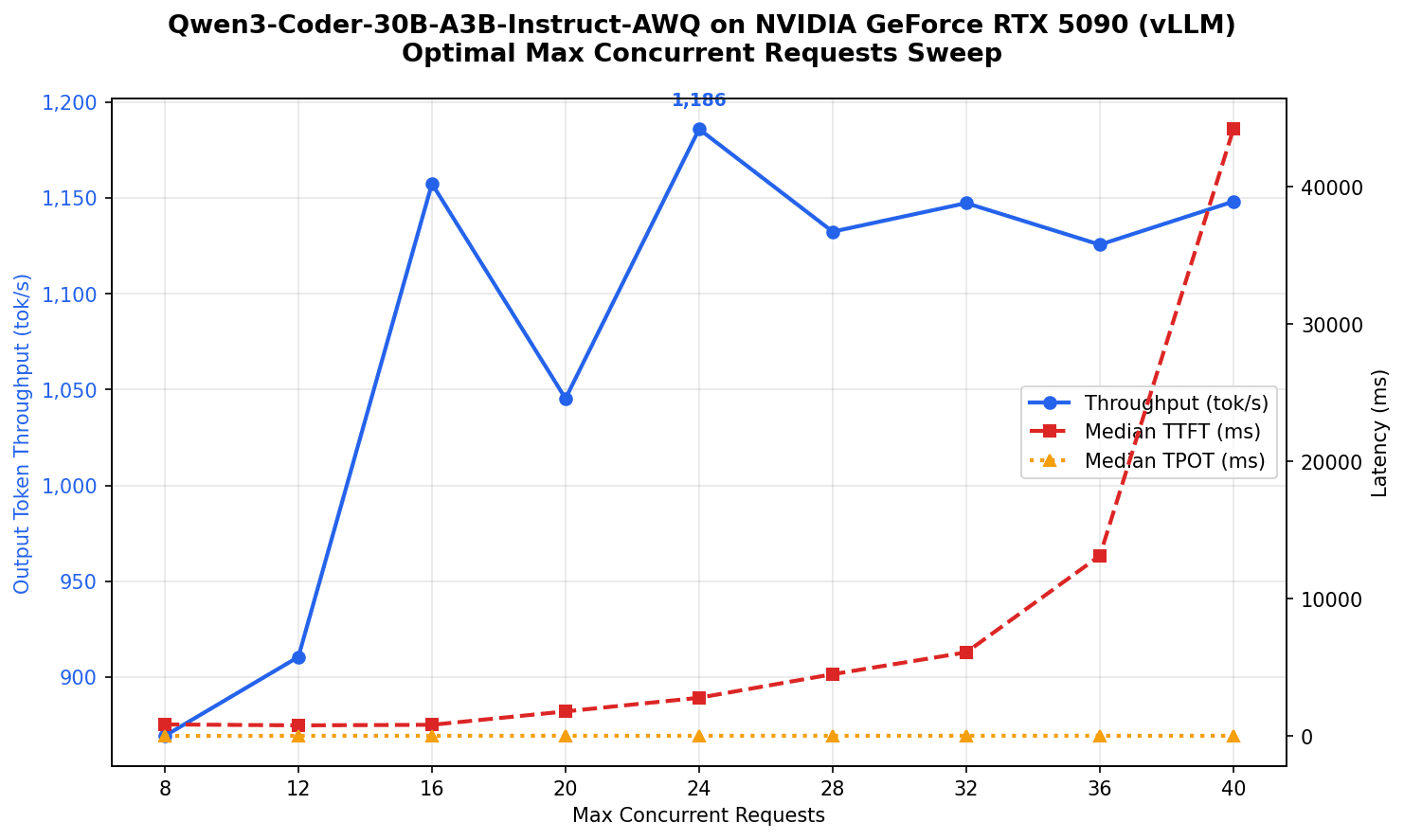
I swept MCR values while keeping benchmark.max_concurrency equal to MCR, so the benchmark actually saturates the engine at each level.
RTX 5090 (vLLM, context=114,688)
| MCR | Throughput (tok/s) | Mean TTFT (ms) | Median TPOT (ms) |
|---|---|---|---|
| 8 | 869 | 753 | 9.0 |
| 12 | 910 | 806 | 12.8 |
| 16 | 1,157 | 956 | 13.6 |
| 20 | 1,045 | 2,064 | 17.0 |
| 24 | 1,186 | 4,957 | 17.2 |
| 28 | 1,132 | 10,471 | 18.3 |
| 32 | 1,147 | 19,299 | 18.2 |
Peak throughput is 1,186 tok/s at MCR=24, but TTFT has already ballooned to nearly 5 seconds. MCR=16 gives 1,157 tok/s with sub-second TTFT (956ms) -- only 2.4% less throughput but 5x better latency.
I went with MCR=16.
PRO 6000 — SGLang (context=262,144)
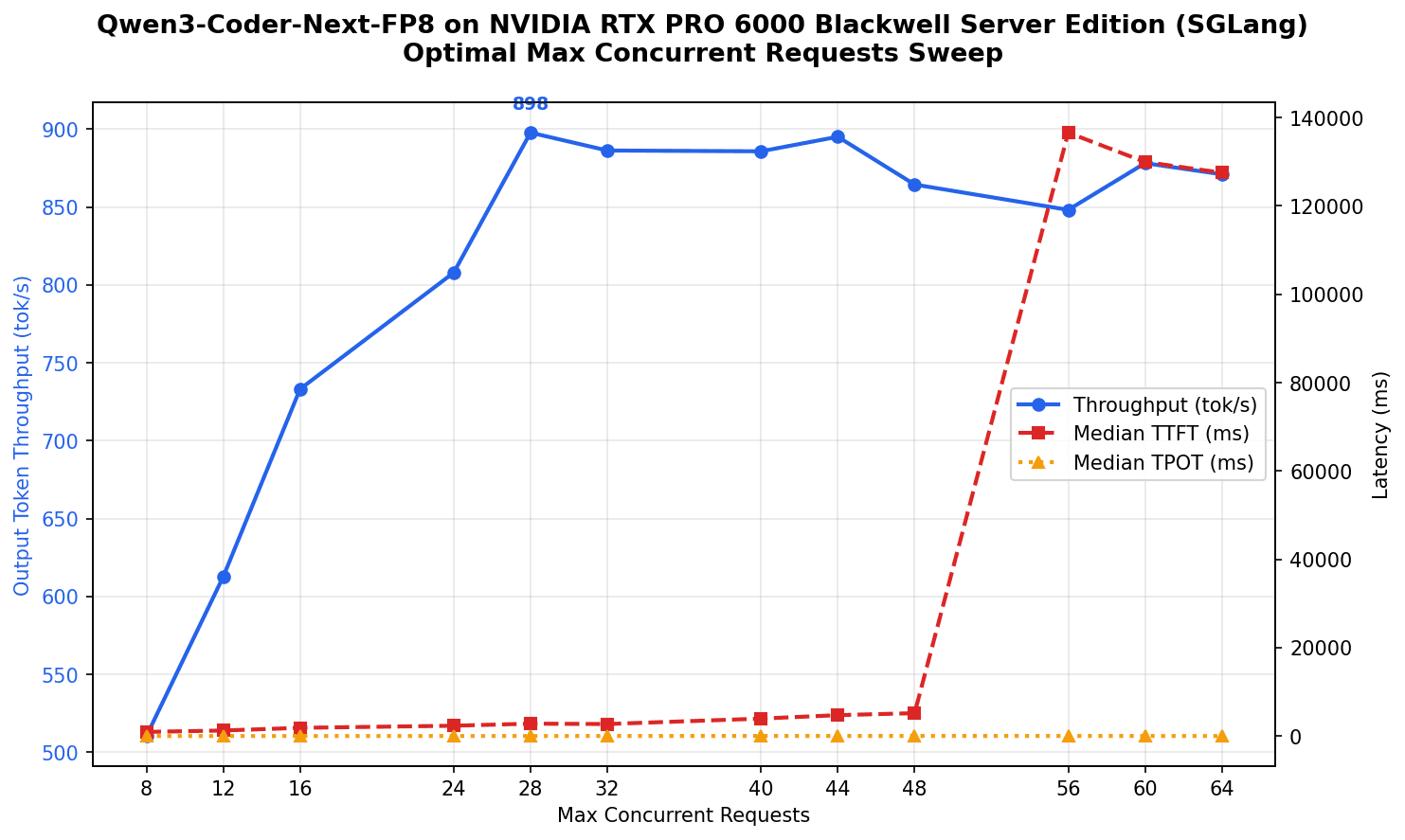
| MCR | Throughput (tok/s) | Mean TTFT (ms) | Median TPOT (ms) |
|---|---|---|---|
| 8 | 510 | 1,057 | 15.4 |
| 16 | 733 | 1,760 | 21.6 |
| 24 | 808 | 2,388 | 27.2 |
| 28 | 898 | 2,804 | 29.1 |
| 32 | 886 | 3,000 | 33.1 |
| 40 | 886 | 14,744 | 36.4 |
| 48 | 864 | 50,779 | 35.6 |
Peak throughput: 898 tok/s at MCR=28, then it plateaus, and TTFT explodes at MCR=40+.
PRO 6000 — vLLM (context=262,144)
SGLang plateauing at 898 tok/s didn't sit right. It won the low-concurrency comparison in Step 1, but high-concurrency behavior can be very different. So I ran the same MCR sweep with vLLM.
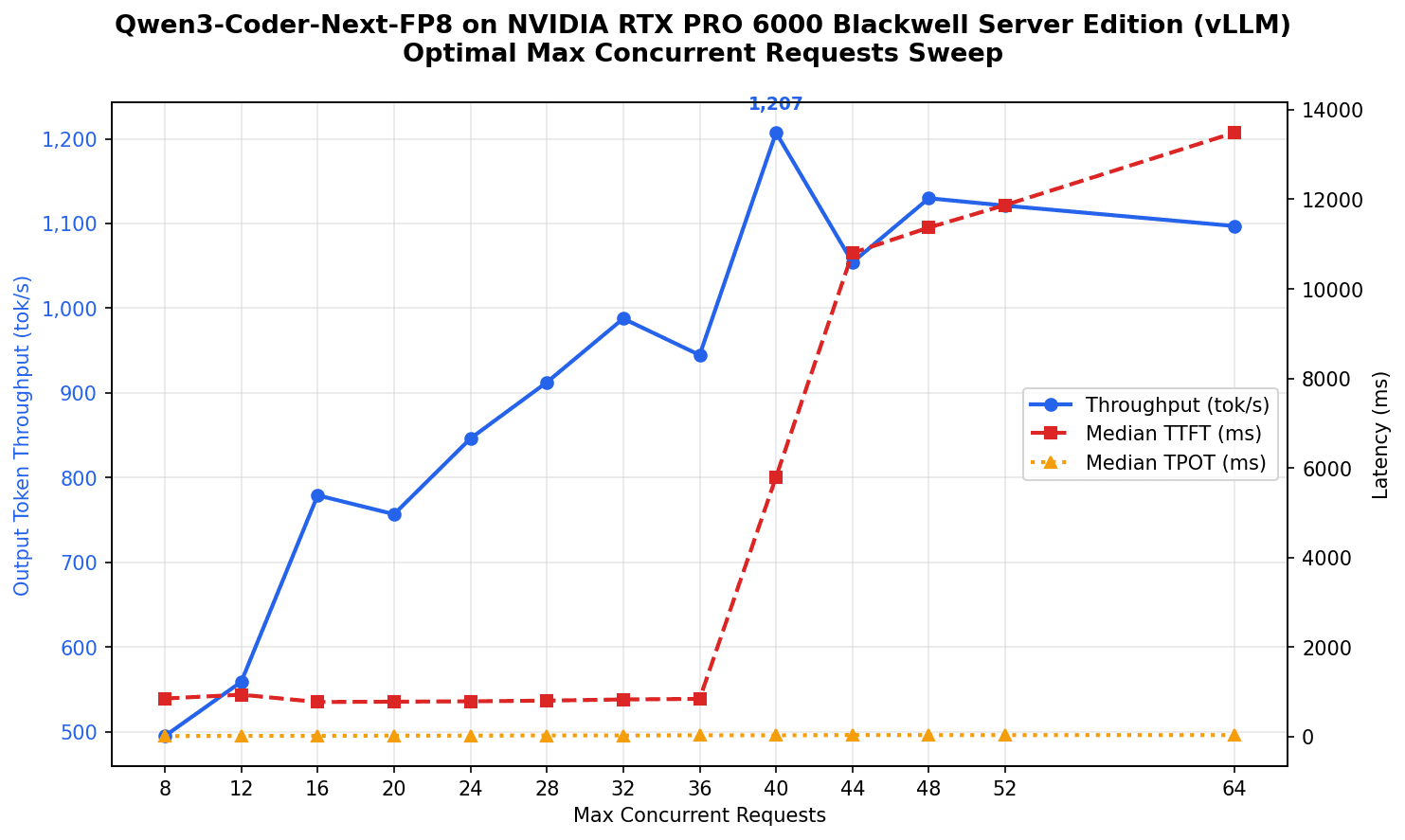
| MCR | Throughput (tok/s) | Mean TTFT (ms) | Median TPOT (ms) |
|---|---|---|---|
| 8 | 495 | 1,768 | 15.7 |
| 16 | 779 | 2,882 | 19.9 |
| 24 | 846 | 4,083 | 25.4 |
| 32 | 988 | 5,399 | 28.5 |
| 40 | 1,207 | 6,918 | 31.6 |
| 44 | 1,054 | 7,944 | 38.8 |
| 48 | 1,130 | 9,107 | 36.4 |
1,207 tok/s at MCR=40 -- 34% higher than SGLang's best. vLLM's TTFT increases gradually without the sudden cliff that SGLang shows, and native FP8 support means no workaround flags needed.
For the optimized recipe I picked a balanced MCR=32: 988 tok/s with 5.4s TTFT. If latency is a concern, the best choice would be SGLang at MCR=28 (898 tok/s with 2.8s TTFT). If throughput is more important than latency, vLLM at MCR=40 is the way to go (1,207 tok/s with 6.9s TTFT).
Final Configurations and Results
| RTX 5090 | PRO 6000 | |
|---|---|---|
| Model | Qwen3-Coder-30B-A3B-Instruct-AWQ | Qwen3-Coder-Next-FP8 |
| Engine | vLLM | vLLM |
| Context Length | 114,688 | 262,144 |
| Max Concurrent Requests | 16 | 32 |
| Throughput | 1,157 tok/s | 988 tok/s |
| Mean TTFT | 956 ms | 5,399 ms |
RTX 5090 Recipe
model:
  huggingface: "QuantTrio/Qwen3-Coder-30B-A3B-Instruct-AWQ"

engine:
  llm:
    tensor_parallel_size: 1
    pipeline_parallel_size: 1
    gpu_memory_utilization: 0.9
    context_length: 114688
    max_concurrent_requests: 16
    vllm:
      image: "vllm/vllm-openai:latest"

benchmark:
  max_concurrency: 16
  num_prompts: 80
  random_input_len: 4000
  random_output_len: 4000

matrices:
  - deploy.gpu: "NVIDIA GeForce RTX 5090"
    deploy.gpu_count: 1
PRO 6000 Recipe
model:
  huggingface: "Qwen/Qwen3-Coder-Next-FP8"

engine:
  llm:
    tensor_parallel_size: 1
    pipeline_parallel_size: 1
    gpu_memory_utilization: 0.9
    context_length: 262144
    max_concurrent_requests: 32
    vllm:
      image: "vllm/vllm-openai:latest"

benchmark:
  max_concurrency: 32
  num_prompts: 80
  random_input_len: 4000
  random_output_len: 4000

matrices:
  - deploy.gpu: "NVIDIA RTX PRO 6000 Blackwell Server Edition"
    deploy.gpu_count: 1
How to Deploy
Install DeploDock and deploy using the command line tool:
# Local deployment on RTX 5090
deplodock deploy local --recipe recipes/Qwen3-Coder-30B-A3B-Instruct-AWQ

# Remote deployment on PRO 6000 via SSH
deplodock deploy ssh \
  --recipe recipes/Qwen3-Coder-Next-FP8 \
  --server user@your-pro6000-server
DeploDock generates a Docker Compose file, pulls the model, and starts vLLM with an OpenAI-compatible API at http://localhost:8000 or the server's IP.
Understanding the Recipe Format
To run large benchmark sweeps with multiple configurations, you need a way to specify all the parameters and their variations. DeploDock's recipe format allows you to define your model, engine parameters, benchmark settings, and then specify matrices of parameters to sweep over.
Here's the annotated hypothetical MCR sweep recipe:
# HuggingFace model ID -- deplodock downloads it automatically
model:
  huggingface: "QuantTrio/Qwen3-Coder-30B-A3B-Instruct-AWQ"

# Framework-agnostic serving parameters
# These map to the right CLI flags for vLLM or SGLang:
engine:
  llm:
    # tensor_parallel_size: --tensor-parallel-size (vLLM) / --tp (SGLang)
    tensor_parallel_size: 1
    # pipeline_parallel_size: --pipeline-parallel-size (vLLM) / --dp (SGLang)
    pipeline_parallel_size: 1
    # gpu_memory_utilization: --gpu-memory-utilization (vLLM) / --mem-fraction-static (SGLang)
    gpu_memory_utilization: 0.9
    # context_length: --max-model-len (vLLM) / --context-length (SGLang)
    context_length: 114688
    # Framework-specific section: Docker image, extra_args, extra_env
    vllm:
      # Docker image to use for vLLM
      image: "vllm/vllm-openai:latest"
      # flags not covered by named fields, passed verbatim
      extra_args: "--kv-cache-dtype fp8 --enable-expert-parallel"
      # environment variables injected into the container
      extra_env:
        VLLM_ATTENTION_BACKEND: FLASHINFER

# Benchmark parameters for vllm bench serve
benchmark:
  random_input_len: 4000
  random_output_len: 4000

# Parameter sweep definitions
# Scalars (deploy.gpu, num_prompts) are broadcast to all runs
# Lists are zipped -- this expands into 9 runs, one per MCR value
matrices:
  - deploy.gpu: "NVIDIA GeForce RTX 5090"
    deploy.gpu_count: 1
    engine.llm.max_concurrent_requests: [8, 12, 16, 20, 24, 28, 32, 36, 40]
    benchmark.max_concurrency: [8, 12, 16, 20, 24, 28, 32, 36, 40]
    benchmark.num_prompts: 80
Automated Benchmarking with GitHub Actions
All experiments in this article were run through a GitHub Actions workflow:
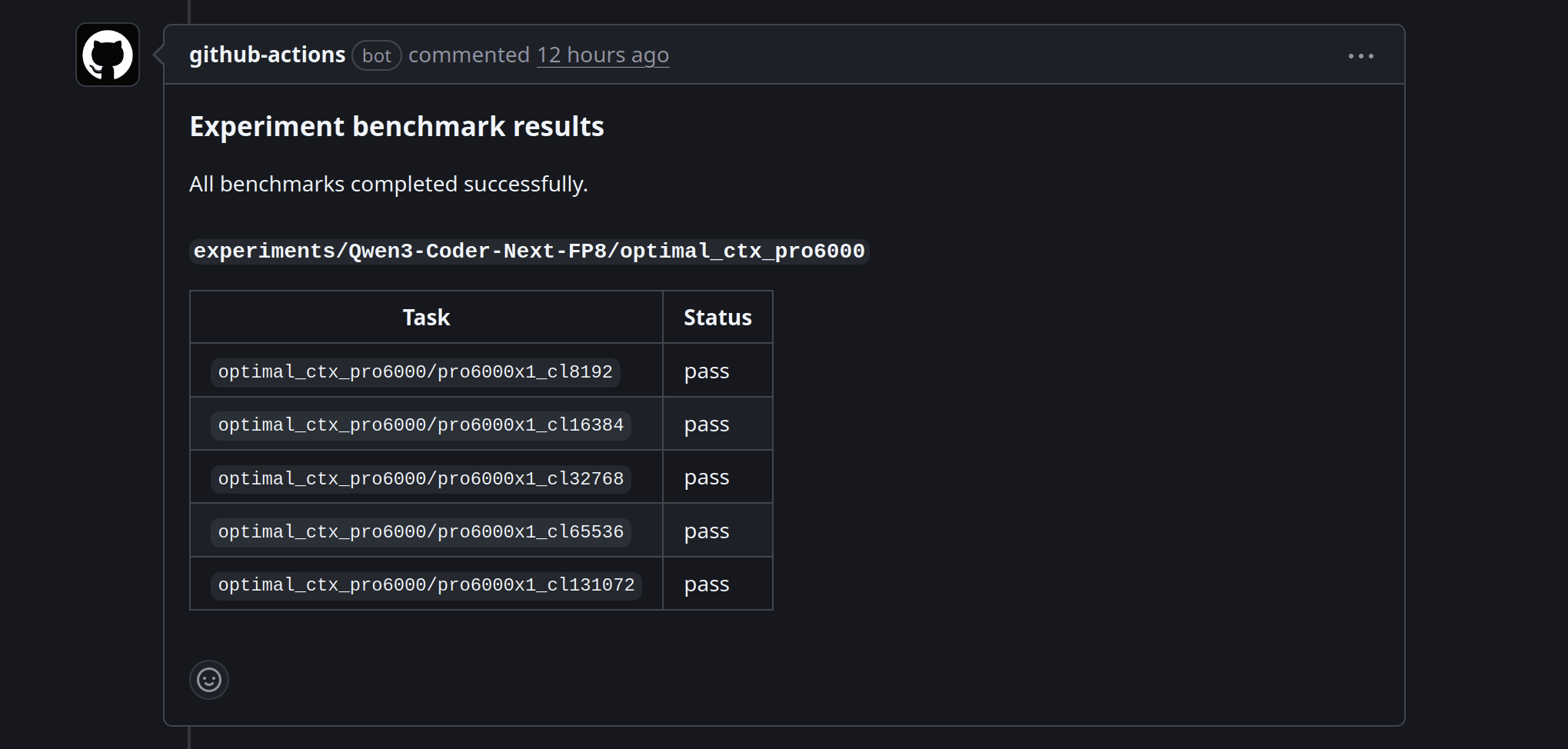
- Add a
recipe.yamltoexperiments/YourModel/your_experiment/ - Open a PR
- A maintainer comments
/run-experiment - The bot provisions cloud VMs, deploys the model, runs all benchmark variants, collects results, and posts them back to the PR
- Benchmark numbers, plots, and raw JSON get committed to the experiment directory
Real example: PR #60, which ran the PRO 6000 SGLang MCR sweep from this article.
Run your own experiments
I'm opening this infrastructure up, and it can be used for free use in March 2026. To run your own benchmarks:
- Fork cloudrift-ai/deplodock
- Create your experiment:
experiments/YourModel/your_experiment/recipe.yaml - Open a PR against the main repo
- A maintainer runs
/run-experiment-- results get posted to your PR
CloudRift has GCP credits available for community experiments (the leftovers that we haven't managed to use that are expiring in March 2026). If you have an experiment in mind, submit a PR with the recipe, and if it looks good, I'll run it on GCP or CloudRift for free. I will be available in Discord to help with recipe writing, framework extension, and troubleshooting.
Available GPUs through CloudRift:
- NVIDIA GeForce RTX 4090 (24GB)
- NVIDIA GeForce RTX 5090 (32GB)
- NVIDIA L40S (48GB)
- NVIDIA RTX PRO 6000 Blackwell Workstation Edition (96GB)
Available GPUs through GCP:
- NVIDIA H100 (80GB)
- NVIDIA H200 (141GB)
- NVIDIA B200 (180GB)
- NVIDIA RTX PRO 6000 Blackwell Server Edition (96GB)