GPU VM Performance: Do vCPU Pinning and NUMA Topology Really Matter?
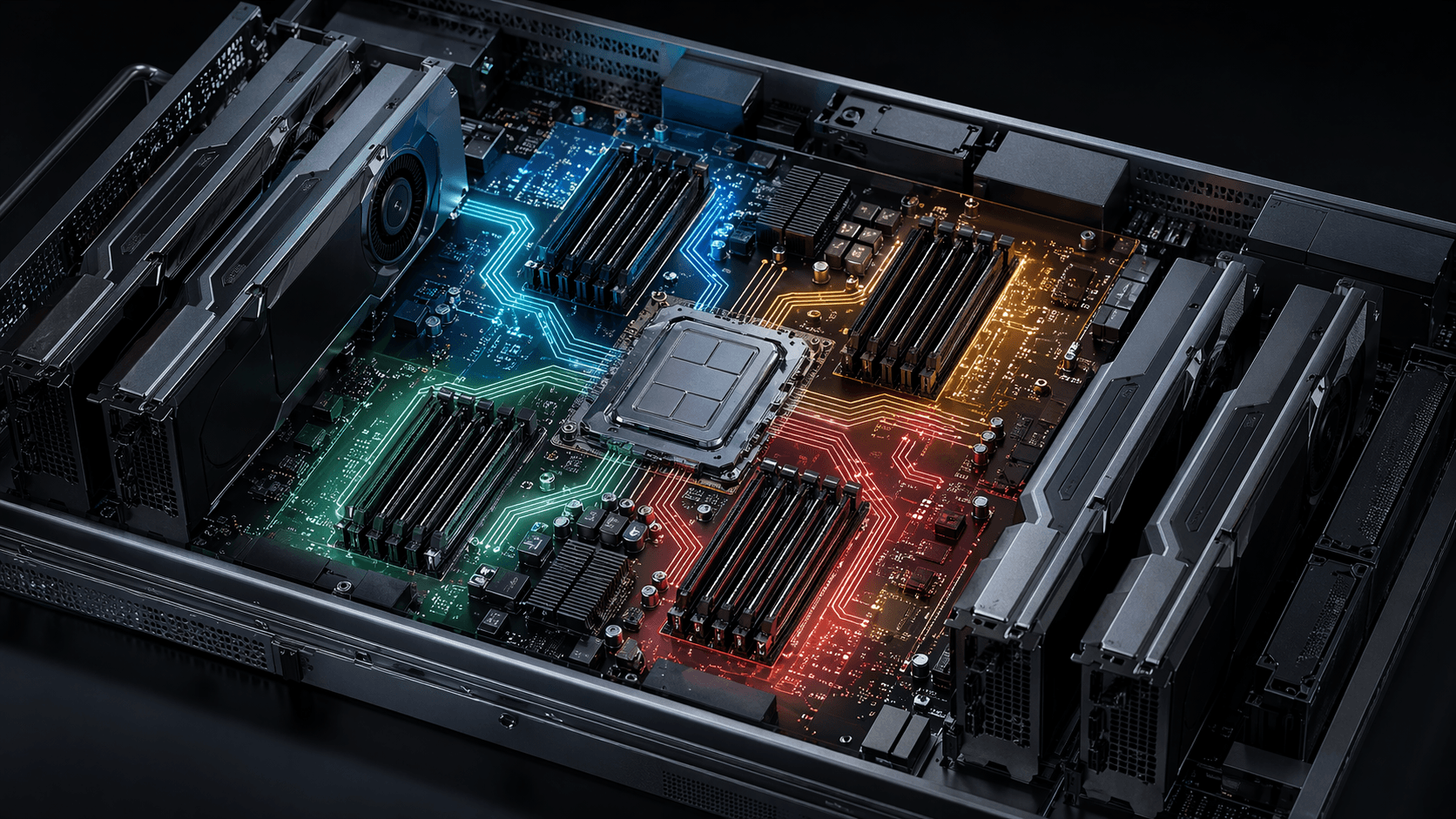
When you spin up a large KVM VM with libvirt and pass through a pile of GPUs, it is tempting to assume the default CPU and memory layout will be "good enough." In our tests, that turned out to be a bad assumption.
Leaving the domain close to its libvirt/QEMU defaults gave us guest layouts that were valid, but often not especially helpful for bandwidth-sensitive workloads. On some hosts the guest behaved like a flat single-NUMA machine sitting on top of a multi-NUMA server; on others, the implicit CPU topology was simply not what we would have chosen by hand. None of this is exotic or broken. It just means the defaults are designed to boot broadly, not to squeeze the most out of a GPU-heavy VM.
So we ran the same benchmark set across six GPU systems to answer a practical question: when do vCPU pinning and guest NUMA topology actually help, and when do they backfire?
What Is NUMA and Why Does It Matter?
Modern servers do not present memory as one perfectly uniform pool. Instead, RAM is divided into regions that are closer to some cores than others. That design is called Non-Uniform Memory Access (NUMA): local memory is faster, remote memory is slower because requests have to cross an interconnect on the way there and back.
A dual-socket server is the easiest example: RAM attached to socket 0 is local to socket 0 and remote to socket 1. But the same idea also shows up inside many single-socket servers. AMD EPYC systems, for example, can expose multiple NUMA domains within one package depending on the platform and firmware settings.
For GPU VMs, there are really two separate locality problems:
-
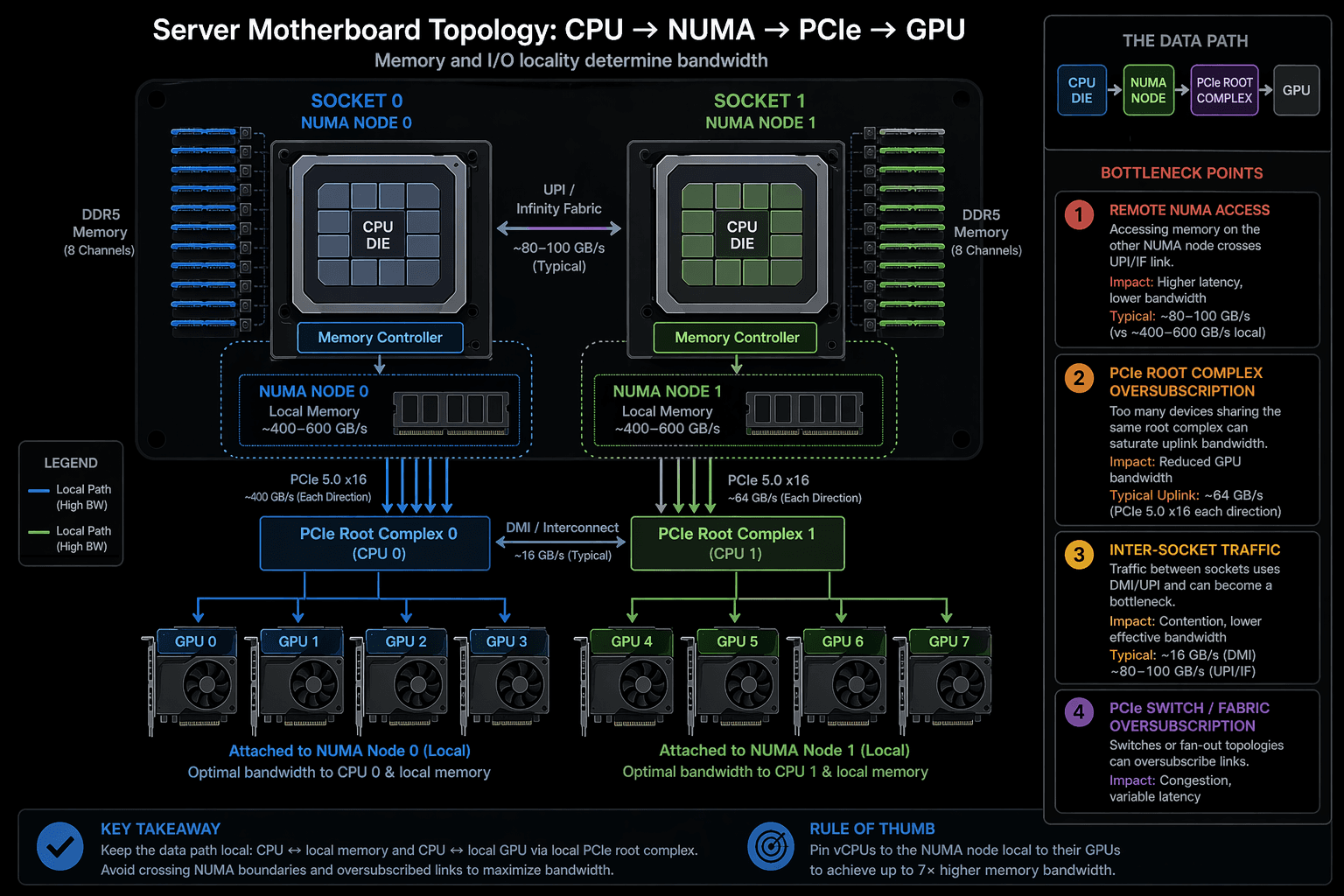
Host memory placement for GPU DMA. When a GPU transfers data to or from host RAM, those pages live on some physical NUMA node. If they are remote from the GPU's PCIe root complex, the transfer has to cross the interconnect and you pay for it in latency or bandwidth.
-
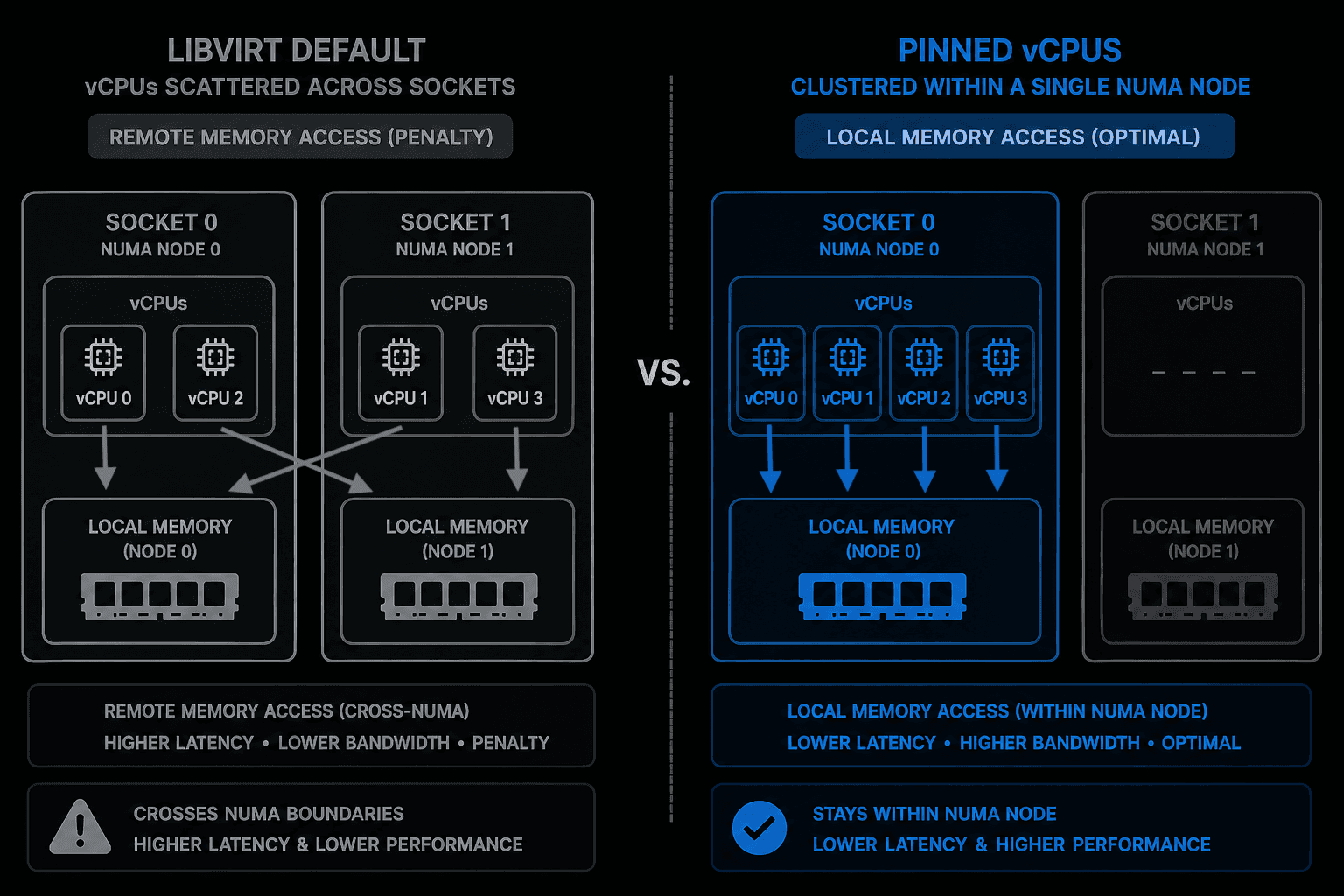
CPU scheduling and topology. If you do not pin vCPUs, the host scheduler is free to move QEMU's vCPU threads around. Separately, the guest OS makes its own scheduling decisions based on the virtual topology it sees. Those are different layers, but both affect cache locality and memory placement. The important distinction is that the guest does not automatically know the host's real NUMA layout underneath it. It only knows the virtual CPU and NUMA topology that the hypervisor exposes.
The configurations in this benchmark attack both problems from different angles: pinning stabilizes where the vCPU threads run on the host, and exposing NUMA topology to the guest gives the guest allocator a chance to keep memory closer to the work using it.
Test Setup
Six GPU systems were tested, each on a different host.
| GPU | Host CPU | GPUs in VM | vCPUs |
|---|---|---|---|
| NVIDIA H200 | Intel Xeon Platinum 8558 | 7 | 94 |
| AMD Instinct MI350X VF | AMD EPYC 9575F | 8 | 120 |
| NVIDIA RTX PRO 6000 Blackwell | Intel Xeon Platinum 8468V | 8 | 88 |
| NVIDIA GeForce RTX 4090 | AMD EPYC 7702 | 4 | 60 |
| NVIDIA GeForce RTX 4080 (desktop, for reference) | Intel Core i9-14900K | 1 | 24 |
| NVIDIA GeForce RTX 5090 | AMD EPYC 7702 | 8 | 56 |
The RTX 4080 entry is a local desktop PC included as a consumer baseline — it shows how the same KVM/libvirt configs behave on a single-NUMA desktop platform compared to multi-NUMA datacenter servers.
Each system was tested across four libvirt configurations:
default— no vCPU pinning, single NUMA node visible to the guest. In practice this means we left the domain close to the stock libvirt/QEMU behavior instead of hand-tuning the XML.vcpu_pin— one hardware thread from each selected physical core is pinned on the host, but the guest is still presented with a single flat NUMA node.vcpu_pin_numa— the same style of one-thread-per-core pinning, but now the corresponding NUMA topology is also exposed to the guest (guest sees 2–4 NUMA nodes matching the chosen host layout).vcpu_pin_numa_smt— same NUMA-aware layout as above, but now both SMT siblings of each selected physical core are exposed as guest vCPUs (doubles the visible vCPU count).
One nuance is worth calling out up front: if you leave CPU topology implicit, QEMU fills in the missing sockets/cores/threads values on its own, and that behavior has changed over time. So "default" here should be read as "what the stock stack produced on these hosts," not as a universal libvirt law.
We also tested SMT on purpose. A lot of VM tuning advice assumes that if a host exposes two hardware threads per core, the guest should see both. That sounds sensible on paper, but GPU VMs are often bottlenecked by memory locality, DMA, or the GPUs themselves rather than by raw host thread count. I wanted to see whether exposing SMT siblings actually helps, or just makes the topology more crowded.
Simultaneous Multithreading (SMT) lets one physical CPU core expose two logical threads to the operating system. Those threads share the same execution resources, so SMT can improve utilization when one thread would otherwise leave part of the core idle, but it does not behave like adding a second physical core. For GPU VMs, that distinction matters because exposing SMT siblings doubles the visible vCPU count without doubling the actual CPU resources behind it.
Another distinction that matters throughout this article: when I say a configuration is "single NUMA" or "NUMA-aware," I mean what the guest sees. The host may still have multiple physical NUMA nodes under the VM. For example, vcpu_pin can pin vCPUs onto cores that live on more than one host NUMA node while still presenting the guest with one flat NUMA node.
Benchmarks run inside the guest: sysbench for CPU, STREAM for memory bandwidth, a pointer-chase binary for memory latency, PyTorch matmul for GPU compute, CUDA bandwidthTest for PCIe transfers, and NCCL all_reduce_perf for multi-GPU collectives. All benchmark scripts are available at github.com/6erun/vcpu_benchmarks.
One important note on NCCL: we ran all collective benchmarks with NCCL_P2P_DISABLE=1. That intentionally shifts the test toward host-memory and PCIe behavior rather than direct GPU-to-GPU links such as NVLink or xGMI.
Memory Bandwidth: the Headline Result
If there was one part of the dataset that made the case for NUMA-aware configuration, it was STREAM. Aggregate memory bandwidth changed more here than anywhere else.
| System | default | vcpu_pin | vcpu_pin_numa | Multiplier |
|---|---|---|---|---|
| H200 | 77,243 MB/s | 75,311 MB/s | 561,170 MB/s | 7.3× |
| MI350X | 241,095 MB/s | 315,806 MB/s | 812,702 MB/s | 2.8× |
| RTX PRO 6000 Blackwell | 82,565 MB/s | 81,125 MB/s | 260,592 MB/s | 3.2× |
| RTX 4090 | 39,113 MB/s | 23,972 MB/s | 74,462 MB/s | ~2× |
| RTX 5090 | 5,553 MB/s | 4,476 MB/s | 5,788 MB/s | (see below) |
The H200 host has four physical NUMA nodes, and once the guest could see that layout, STREAM bandwidth jumped from roughly one-node territory to 561 GB/s. I would not overstate that as "only one controller was active" before the change, but the practical outcome is clear: the flat guest layout was not using the machine's memory subsystem well, and the NUMA-aware layout was.
This is not a tuning improvement. It is a structural ceiling that the default config cannot reach.
vCPU pinning alone (vcpu_pin, single NUMA) did little for STREAM bandwidth. In these runs, the big jump came when the guest had enough topology information to place work and memory with some awareness of locality.
When vcpu_pin alone makes things worse
Pinning 60 vCPUs on the RTX 4090 (vcpu_pin_60c) dropped STREAM from 39 to 24 GB/s. The most likely explanation is that we pinned threads across multiple host NUMA nodes while still presenting a flat guest memory layout, so the workload paid remote-memory penalties without any guest-level awareness of locality. Adding guest NUMA topology recovered the loss and then some, reaching 74 GB/s.
The RTX 5090 tells a different story. Its bandwidth is stuck around 5.5 GB/s with 56 threads, or about 100 MB/s per thread, which is far too low to treat as a normal tuning result. The same host also showed PCIe numbers that looked like a Gen 2 link. Taken together, that makes this box more of a diagnostic case than a clean comparison. It needs host-side cleanup before its VM topology results are trustworthy.
Memory Latency
We only collected meaningful memory-latency data on the H200 and MI350X systems. The other machines were not part of this latency pass, so there is nothing to compare there. This benchmark measures CPU-side load-to-use latency through the CPU memory hierarchy: L1, L2, L3, and then DRAM. In other words, this section is about CPU-to-memory latency, not GPU-to-host-memory latency. H200 also gave us the clearest cache-to-DRAM profile, so it is the best system to use for illustrating how latency changed across the memory hierarchy.
H200 DRAM latency profile in the default config:
| Level | Latency |
|---|---|
| L1 (4–32 KB) | 1.3–1.6 ns |
| L2 (64–512 KB) | 2.1–4.3 ns |
| L3 (1–32 MB) | 5.0–36 ns |
| DRAM (256–512 MB) | 64–140 ns |
Effect of vCPU configuration on DRAM latency:
| H200 config | DRAM latency | Change |
|---|---|---|
| default | 140 ns | — |
| vcpu_pin | 112 ns | −20% |
| vcpu_pin_numa | 101 ns | −28% |
| vcpu_pin_numa_smt | 100 ns | −29% |
Pinning alone cut measured DRAM latency by about 20%, most likely by reducing host-side migration and the cache/TLB churn that comes with it. Full NUMA exposure shaved off a bit more by keeping memory placement better aligned with where the work was running.
SMT barely changed this picture. On H200, going from vcpu_pin_numa to vcpu_pin_numa_smt moved DRAM latency from 101 ns to 100 ns, which is close enough to treat as noise rather than a meaningful gain.
MI350X showed a smaller but still visible NUMA effect at the DRAM level:
| MI350X config | DRAM latency | Change |
|---|---|---|
| default | 144 ns | — |
| vcpu_pin | 145 ns | ~0% |
| vcpu_pin_numa | 135 ns | −7% |
| vcpu_pin_numa_smt | 137 ns | −5% |
That is a useful contrast with H200. On MI350X, pinning alone did essentially nothing for latency, while guest NUMA exposure helped modestly. SMT again did not add much on top.
CPU Throughput (sysbench)
Single-thread performance barely moved in our runs. The wide spread in absolute EVS mostly comes from the host CPUs themselves: the MI350X runs on an AMD EPYC 9575F (Zen 5), the RTX 4090 and 5090 on the older EPYC 7702 (Zen 2), and the RTX 4080 on an Intel Core i9-14900K desktop chip whose high single-thread boost helps it punch above its weight. Here, EVS means events per second, the throughput number reported by sysbench.
Multi-thread results are more interesting:
| System | Config | vCPUs | Total EVS | EVS/thread |
|---|---|---|---|---|
| MI350X | vcpu_pin | 120 | 721,474 | 6,012 |
| MI350X | vcpu_pin_numa_smt | 240 | 740,449 | 3,085 |
| H200 | vcpu_pin | 94 | 232,536 | 2,474 |
| H200 | vcpu_pin_numa_smt | 188 | 237,801 | 1,265 |
This is the clearest SMT result in the whole article. Doubling the guest-visible vCPU count barely changed total CPU throughput:
- MI350X went from 721,474 EVS to 740,449 EVS, a gain of about 2.6%.
- H200 went from 232,536 EVS to 237,801 EVS, a gain of about 2.3%.
In other words, SMT made the VM look much bigger than it really was. The guest saw twice as many CPUs, but the workload did not get twice as much work done. EVS per thread was nearly cut in half because the sibling threads were still sharing the same physical cores and execution resources.
For CPU-bound work like sysbench, that is exactly what you would expect: SMT can help fill in idle execution slots, but it does not create new cores. For this benchmark, exposing SMT siblings was mostly a way to increase scheduling complexity in the guest for a very small throughput gain.
RTX 4080 regression: Pinning 22 vCPUs on the RTX 4080 dropped total CPU EVS from 99,697 → 63,972 compared to the unpinned 24-vCPU config. The pinned cores likely span two L3 cache domains on the host, making inter-thread communication more expensive. The pin mapping should be reviewed to keep all vCPUs within a single LLC (last-level cache) domain.
GPU Compute (PyTorch FP16 Matmul)
FP16 matrix multiply, 100 iterations:
| GPU | Time (ms/iter) | Relative throughput |
|---|---|---|
| AMD MI350X VF | 8.1–8.3 | 2.6× faster than H200 |
| NVIDIA RTX 5090 | 16.6 | 1.3× faster than H200 |
| NVIDIA H200 | 21.1–21.4 | baseline |
| NVIDIA RTX PRO 6000 Blackwell | 21.1–21.3 | ≈ H200 |
| NVIDIA RTX 4090 | 20.1–20.2 | ≈ H200 |
| NVIDIA RTX 4080 | 31.7–32.3 | 0.66× H200 |
Matmul time was effectively identical across all pinning configurations for every GPU. For this benchmark, host CPU and NUMA placement simply did not move the needle in a meaningful way once the data was on the device.
The MI350X VF result is notable: over 2.5× faster than the H200 for this FP16 workload, consistent with the MI350X's enhanced matrix throughput.
PCIe Bandwidth (GPU ↔ Host)
Measured with CUDA bandwidthTest --memory=pinned, 5 runs:
| GPU | H2D (GB/s) | D2H (GB/s) | PCIe gen |
|---|---|---|---|
| H200 | 55.3 | 41.5–55.3 | Gen 5 |
| MI350X VF | 55–56 | 57 | Gen 5 (VF) |
| RTX PRO 6000 Blackwell | 56 | 57 | Gen 5 |
| RTX 4090 | 22.6–25.7 | 22.7–25.0 | Gen 4 |
| RTX 4080 | 24.0–24.1 | 26.1–26.2 | Gen 4 |
| RTX 5090 | 5.0–5.3 | 4.8–5.2 | Gen 2 (bug) |
Server-class GPUs (H200, MI350X, RTX PRO 6000 Blackwell) achieve ~55–57 GB/s H2D, consistent with PCIe Gen 5 x16. Consumer RTX 4090 and 4080 land at ~22–26 GB/s, consistent with Gen 4 x16 on a workstation platform.
The RTX 5090 achieves ~5.3 GB/s, which is in the ballpark of PCIe Gen 2 x16 throughput. Every other GPU is at least 4x faster. That usually points to a link-training or slot/configuration problem, not to an architectural limit of the GPU itself.
NCCL Collective Bandwidth
This was the trickiest part of the study. NUMA helped some systems, barely mattered on others, and clearly hurt when collective traffic had to keep crossing nodes through host memory.
SMT also turned out to be mostly irrelevant here. Where we compared vcpu_pin_numa and vcpu_pin_numa_smt, the NCCL numbers were either effectively unchanged or slightly worse, which tells me the extra logical CPUs were not the limiting factor for these collectives.
RTX PRO 6000 Blackwell — pinning gives +144%
| Config | Peak busbw | Avg busbw |
|---|---|---|
| default | 8.4 GB/s | 5.4 GB/s |
| vcpu_pin | 20.5 GB/s | 7.1 GB/s |
| vcpu_pin_numa | 7.6 GB/s | 4.9 GB/s |
| vcpu_pin_numa_smt | 7.6 GB/s | 5.0 GB/s |
For this 8-GPU system, plain vCPU pinning was the clear winner. The best explanation is that keeping the vCPU threads stable removed enough jitter from the host-side path to let the collective settle into a much better steady state.
Adding guest NUMA exposure (2 nodes) dropped performance back near the default. In this layout, making the guest NUMA-aware appears to have encouraged a less favorable memory placement pattern for at least part of the GPU set.
Adding SMT on top of NUMA exposure did not change the outcome in any meaningful way: 7.6 GB/s peak bandwidth with and without SMT, and average bandwidth stayed within measurement noise.
H200 — NUMA exposure cuts NCCL in half
| Config | NUMA nodes | Peak busbw | Change |
|---|---|---|---|
| default | 1 | 20.2 GB/s | — |
| vcpu_pin | 1 | 18.4 GB/s | −9% |
| vcpu_pin_numa | 4 | 8.6 GB/s | −57% |
| vcpu_pin_numa_smt | 4 | 8.3 GB/s | −59% |
The H200 host has four NUMA nodes and seven GPUs spread across them. With P2P disabled, every collective step that misses locality ends up paying through host memory. On this machine, exposing four guest NUMA nodes cut peak NCCL bandwidth by more than half. The most plausible explanation is that the ring spent too much time crossing NUMA boundaries.
The practical takeaway is simple: use vcpu_pin (single NUMA) for GPU collective workloads on this system. If you want the 7x memory-bandwidth gain from NUMA exposure, reserve that config for CPU-heavy jobs or retest with GPU P2P enabled in an environment that actually supports it.
Again, SMT did not rescue the NUMA-aware config. Peak bus bandwidth moved from 8.6 GB/s to 8.3 GB/s, which is the opposite of a useful win.
MI350X — stable across all configs
| Config | Peak busbw | Avg busbw |
|---|---|---|
| default | 11.3 GB/s | 4.7 GB/s |
| vcpu_pin | 11.8 GB/s | 5.0 GB/s |
| vcpu_pin_numa | 11.4 GB/s | 4.8 GB/s |
| vcpu_pin_numa_smt | 11.4 GB/s | 4.8 GB/s |
The MI350X VF setup was remarkably stable across all configs. Whatever combination of host layout, VF behavior, and workload characteristics caused that, the practical takeaway is straightforward: guest NUMA exposure did not buy much here, but it also did not hurt.
The same goes for SMT: 11.4 GB/s peak and 4.8 GB/s average with and without it. For this kind of GPU-heavy communication workload, more guest threads simply were not the bottleneck.
RTX 5090 — flat at 0.53 GB/s
The RTX 5090 NCCL curve is essentially flat from 64 KB through 1 GB at ~0.53 GB/s bus bandwidth — roughly 40× slower than the H200. A normal NCCL curve ramps up as message size grows and fixed setup overhead amortises. The flat curve indicates a hard bandwidth ceiling: the PCIe Gen 2 link saturates immediately, and all 8 GPUs share the same root complex without PCIe switches.
Summary: What Actually Matters
| Metric | vcpu_pin benefit | NUMA exposure benefit | SMT benefit | NUMA risk |
|---|---|---|---|---|
| Single-thread CPU | Negligible | Negligible | N/A | None |
| Multi-thread CPU | Slight | None | Only +2–3% total | None |
| STREAM bandwidth | Slight | 2–7× | Not shown to matter | None |
| DRAM latency | −20% | −28% | ~None | None |
| GPU H2D/D2H | Negligible | Negligible | Negligible | None |
| GPU matmul | None | None | None | None |
| NCCL (same-node GPUs) | +40–144% | Neutral | ~None | None |
| NCCL (cross-node GPUs) | Moderate | −40–57% | ~None | Yes |
If you want one conservative starting point, use vcpu_pin and keep the guest single-NUMA. Across these tests, that was the safest default for GPU-heavy workloads: it reduced latency noise and often helped NCCL, without introducing the extra placement risk that came with guest NUMA exposure.
Add guest NUMA exposure only when: you have checked where the GPUs sit physically, or you know the workload genuinely needs the extra host memory bandwidth. Check GPU NUMA assignment with:
nvidia-smi --query-gpu=pci.bus_id --format=csv,noheader | while read bdf; do
  bdf_lower=$(echo "$bdf" | tr '[:upper:]' '[:lower:]' | sed 's/^0000//')
  echo "$bdf -> NUMA node $(cat /sys/bus/pci/devices/${bdf_lower}/numa_node)"
done
Skip SMT for GPU workloads unless you have a very specific reason not to. In this dataset, doubling the visible vCPU count only improved CPU throughput by about 2–3%, did not help NCCL, and barely moved latency at all.
One place where SMT may still make sense is a high-density MIG or vGPU setup. That is a different problem from the large passthrough VMs tested here: instead of chasing maximum performance from a handful of big GPU guests, you are often trying to pack many smaller GPU instances onto one host. In that kind of environment, SMT can help absorb bursty driver, networking, inference-serving, or orchestration overhead without adding more physical cores. That is mostly a consolidation benefit, not a guarantee of better per-instance performance.
Applying the Configs
All XML variants in this benchmark were generated with gen_vcpu_pinning.py, a script that reads an existing domain XML, patches in the correct <cputune>, <cpu>, and <numatune> blocks, and writes a new file. Start by mapping your host topology:
# NUMA nodes and which physical CPUs belong to each
numactl --hardware

# Full CPU/core/thread table — find SMT siblings
lscpu -e=CPU,NODE,SOCKET,CORE

# Per-NUMA-node memory information
grep . /sys/devices/system/node/node*/meminfo
One easy point of confusion: the physical id or socket information you may see in /proc/cpuinfo refers to CPU packages, not necessarily to NUMA nodes. For NUMA work, numactl --hardware, lscpu, and /sys/devices/system/node/ are the more reliable views.
The examples below assume a 2-NUMA host with 28 physical cores per node (cores 0–27 on node 0, cores 32–59 on node 1), SMT siblings at 64–91 and 96–123, and a 1.5 TB VM.
Config A — vcpu_pin only (recommended default for GPU workloads)
./gen_vcpu_pinning.py \
  --input vm.xml --output vm-pin.xml --name my-gpu-vm-pin \
  --config A \
  --numa-first 0-27 32-59 \
  --emulator 28,29
Generated XML (56 vCPUs pinned, single NUMA node visible to guest):
<vcpu placement='static'>56</vcpu>
<cputune>
  <emulatorpin cpuset='28,29'/>
  <vcpupin vcpu='0'  cpuset='0'/>
  <vcpupin vcpu='1'  cpuset='1'/>
  <!-- … 52 more entries … -->
  <vcpupin vcpu='54' cpuset='58'/>
  <vcpupin vcpu='55' cpuset='59'/>
</cputune>
<cpu mode='host-passthrough' check='none' migratable='on'/>
No <numatune> block. The guest sees one flat memory space, which keeps the setup simple for GPU jobs but also leaves CPU-side memory bandwidth on the table.
Notice what is happening here: the guest sees one NUMA node, but the pinned host CPUs can still come from more than one physical host NUMA node. In other words, vcpu_pin is "single NUMA" only from the guest's point of view.
Config B — vcpu_pin + NUMA topology
Use when all GPUs are on one physical NUMA node and you also need maximum host memory bandwidth for CPU-side work, or when you want to verify with NCCL that cross-NUMA DMA is not occurring.
./gen_vcpu_pinning.py \
  --input vm.xml --output vm-pin-numa.xml --name my-gpu-vm-pin-numa \
  --config B \
  --numa-first 0-27 32-59 \
  --emulator 28,29 \
  --mem-mib 1572864
Generated XML (56 vCPUs, 2 NUMA nodes exposed, 768 GiB per node):
<vcpu placement='static'>56</vcpu>
<cputune>
  <emulatorpin cpuset='28,29'/>
  <vcpupin vcpu='0'  cpuset='0'/>
  <!-- … -->
  <vcpupin vcpu='55' cpuset='59'/>
</cputune>
<cpu mode='host-passthrough' check='none' migratable='on'>
  <topology sockets='2' cores='28' threads='1'/>
  <numa>
    <cell id='0' cpus='0-27'  memory='786432' unit='MiB'/>
    <cell id='1' cpus='28-55' memory='786432' unit='MiB'/>
  </numa>
</cpu>
<numatune>
  <memory mode='strict' nodeset='0,1'/>
  <memnode cellid='0' mode='strict' nodeset='0'/>
  <memnode cellid='1' mode='strict' nodeset='1'/>
</numatune>
Note the guest vCPU numbering is contiguous (0–55) even though the host physical CPUs are not (0–27, then 32–59). The <numatune> mode='strict' prevents the kernel from silently falling back to remote-node allocations.
Config C — vcpu_pin + NUMA + SMT siblings
Doubles the visible vCPU count by adding each physical core's SMT sibling. Guest vCPU pairs are interleaved so consecutive guest vCPUs always map to the same physical core — this is what the OS scheduler needs to apply its own SMT-aware policies.
./gen_vcpu_pinning.py \
  --input vm.xml --output vm-pin-numa-smt.xml --name my-gpu-vm-pin-numa-smt \
  --config C \
  --numa-first 0-27 32-59 \
  --numa-smt  64-91 96-123 \
  --emulator  28,29,92,93 \
  --mem-mib   1572864
Generated XML (112 vCPUs, threads=2 in topology, SMT interleaved in cputune):
<vcpu placement='static'>112</vcpu>
<cputune>
  <emulatorpin cpuset='28,29,92,93'/>
  <vcpupin vcpu='0'  cpuset='0'/>   <!-- physical core 0, thread 0 -->
  <vcpupin vcpu='1'  cpuset='64'/>  <!-- physical core 0, thread 1 (SMT) -->
  <vcpupin vcpu='2'  cpuset='1'/>   <!-- physical core 1, thread 0 -->
  <vcpupin vcpu='3'  cpuset='65'/>  <!-- physical core 1, thread 1 (SMT) -->
  <!-- … pattern repeats for all 28 cores on node 0, then node 1 … -->
</cputune>
<cpu mode='host-passthrough' check='none' migratable='on'>
  <topology sockets='2' cores='28' threads='2'/>
  <numa>
    <cell id='0' cpus='0-55'   memory='786432' unit='MiB'/>
    <cell id='1' cpus='56-111' memory='786432' unit='MiB'/>
  </numa>
</cpu>
<numatune>
  <memory mode='strict' nodeset='0,1'/>
  <memnode cellid='0' mode='strict' nodeset='0'/>
  <memnode cellid='1' mode='strict' nodeset='1'/>
</numatune>
As the benchmark showed, Config C made the guest topology larger but not meaningfully faster. Unless your specific workload is known to benefit from SMT, Config A is still the better starting point and Config B is the more sensible next step.
Issues Found
RTX 5090: PCIe Gen 2 link (critical)
The RTX 5090 system showed a clear hardware-side problem during testing. H2D/D2H bandwidth was only ~5.3 GB/s and NCCL was far below the other machines, which makes these results unsuitable for a fair topology comparison. We did not have a second RTX 5090 host available to repeat the benchmark, so this system should be treated as an outlier rather than as a representative 5090 result.
If you hit similar numbers on your own hardware, verify the PCIe link speed:
lspci -vv -s <gpu_bdf> | grep -i lnksta
Expected: Speed 8GT/s (Gen 3) or 16GT/s (Gen 4) at Width x16. If you see Speed 5GT/s, the slot is negotiating Gen 2 — check BIOS PCIe speed settings and whether the slot has any physical limitations.
RTX 5090: scattered host vCPUs
The unusually low STREAM result on this host may also point to a broader platform or configuration issue, but we were not able to validate that on a second RTX 5090 machine. Because of that, it is safer to treat the full RTX 5090 result set as compromised by the test environment rather than to draw strong conclusions about vCPU layout from this single system.
H200: NCCL regression with NUMA configs
Use vcpu_pin (single NUMA node) for GPU collective workloads. If you need multi-NUMA bandwidth, isolate that config to non-GPU workloads or enable NVLink/P2P to bypass host memory for collectives.
RTX 4080: vcpu_pin regression
CPU throughput dropped from 99,697 → 63,972 EVS after pinning. The 22 pinned vCPUs likely span two L3 domains. Review the pin XML and keep all vCPUs within one L3 cache domain.
mem_latency returns zeroes on most hosts
The pointer-chase binary's inner loop completes in under 1 µs on most systems; truncation to integer nanoseconds produces zero. Needs recompilation with sub-nanosecond timing or more iterations per measurement.
Conclusions
| System | Verdict | Recommended config |
|---|---|---|
| H200 | Good | vcpu_pin for GPU jobs; vcpu_pin_numa for CPU-bandwidth jobs only |
| MI350X VF | Good | vcpu_pin (stable across all configs) |
| RTX PRO 6000 Blackwell | Good | vcpu_pin — clear NCCL win, no risk |
| RTX 4090 | Acceptable | vcpu_pin_numa to avoid cross-NUMA penalty |
| RTX 4080 | Fine (single-GPU) | Review pin mapping before using vcpu_pin |
| RTX 5090 | Not production-ready | Fix PCIe Gen 2 link first, then fix vCPU NUMA scatter |
The biggest lesson here is not "always expose NUMA" or "always leave it off." It is that GPU VMs are sensitive to topology in different ways depending on whether the bottleneck is CPU memory bandwidth, host-to-GPU DMA, or multi-GPU collectives.
If I were starting from scratch, I would pin vCPUs first, keep the guest single-NUMA, and only expose guest NUMA after checking where the GPUs actually sit and whether the workload needs the extra host memory bandwidth badly enough to justify the risk. I would also leave SMT off unless I was optimizing for tenant density in a MIG or vGPU environment rather than for maximum performance from a large passthrough VM.
The RTX 5090 results are still outliers and should be treated as diagnostic until the PCIe link speed and host placement issues are corrected.